
Hey there! We hope your excited to try out ShareMyToolbox - we’re pumped to have you with us!
We strive to keep our platform easy and intuitive. There are some things we want to point out to guide you in the right direction before you start adding tools (Items) and people (Connections).
First, check out this quick video:
Customize Your Settings
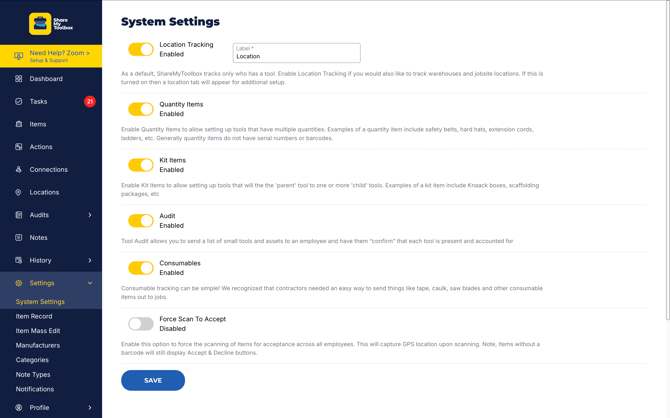
System Settings
The first thing you’ll want to do is visit the System Settings menu. There you’ll find options for enabling things like Location Tracking, Audits, Quantity & Kit Items, and Consumables.
TIP: As a default, ShareMyToolbox tracks only who has an Item. Enable Location Tracking if you would also like to track Warehouses and Jobsite Locations. If this is turned on then a location tab will appear for additional setup.
Item Record Customization
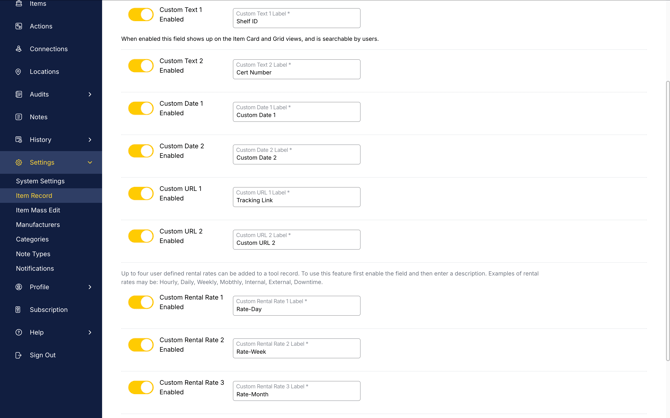
Here’s where you can really start customizing your Item experience. You can set custom text, date and URL fields, plus Custom Rental Rates and more.
Manufacturers, Categories & More
Finally, in Settings you’ll be able to set up and manage the details for Manufacturers, Item Categories, Note Types & More.
TIP: Note Types are great to capture things like Damage Reports, Calibration Notes, or just general information. You have the option to be notified each time a particular note type is created.
Understanding Items
The Items Menu is where you manage all of your tools and other items you want to track. There are 4 types of items in ShareMyToolbox:
- Standard Item: These are your "normal" tools that are tracked individually and typically are serialized. You may also tag them with a barcode. Examples include drills, saws, compressors, etc.
- Quantity Item: These are generally less expensive items that aren't worth tracking individually and don't have serial numbers. Multiple items may be loaned to a crew at the same time. Quantity Items cannot be barcoded. Examples include shovels, safety belts, hardhats, etc. (Business Plans)
- Kit: A kit is a group of items linked together. An item defined as a kit will be the parent item and child items will be associated in a separate step. During workflow, when a kit is selected, all child items will move with the kit. Examples include a Knack box, scaffolding package, etc. (Business Plans)
- Consumable: A consumable is a material item that will not be returned. A costing transaction will be created so that it can be charged to a job. Common examples of consumables are saw blades, caulk, duct tape etc. (Business Plans)